
[Threads Marketing Agent, Part 3] Multi-Account Engagement Automation with an Anti-Detect Browser — Brain/Hands Split, CDP Driving, Detection-Aware Pacing
Part 3 of an engineering log on building a Threads marketing agent: automating engagement (likes/comments). Isolating sub-accounts with an AdsPower anti-detect browser, connecting a VPS (brain) and a Mac mini (hands) over a queue, driving the browser via CDP, and pacing it with a detection-aware random schedule.
On this page
- Introduction
- 1 Why it’s built this way
- 2 Architecture
splitting the brain from the hands
Why two machinesThe host IP isn’t what mattersWho posts which comment - 3 Commenting like a human
- Conclusion
Introduction
This is the final part of the Threads marketing agent series. Part 1 covered the crawling that secures the raw material; Part 2 covered the pipeline that turns it into posts, publishes them, and measures performance. This part is about attaching reactions to published posts — sub-accounts adding comments and likes in distinct voices.
The conclusion up front: this stretch, too, wasn’t an AI problem. The comment text was already generated alongside the body in Part 2, and the real challenge was “how do you make these accounts look like strangers to one another?”
The design comes down to three decisions.
-
Split the brain from the hands. Publishing and the DB live on the VPS; the actual browser driving is done by a Mac mini. The two are connected by a queue.
-
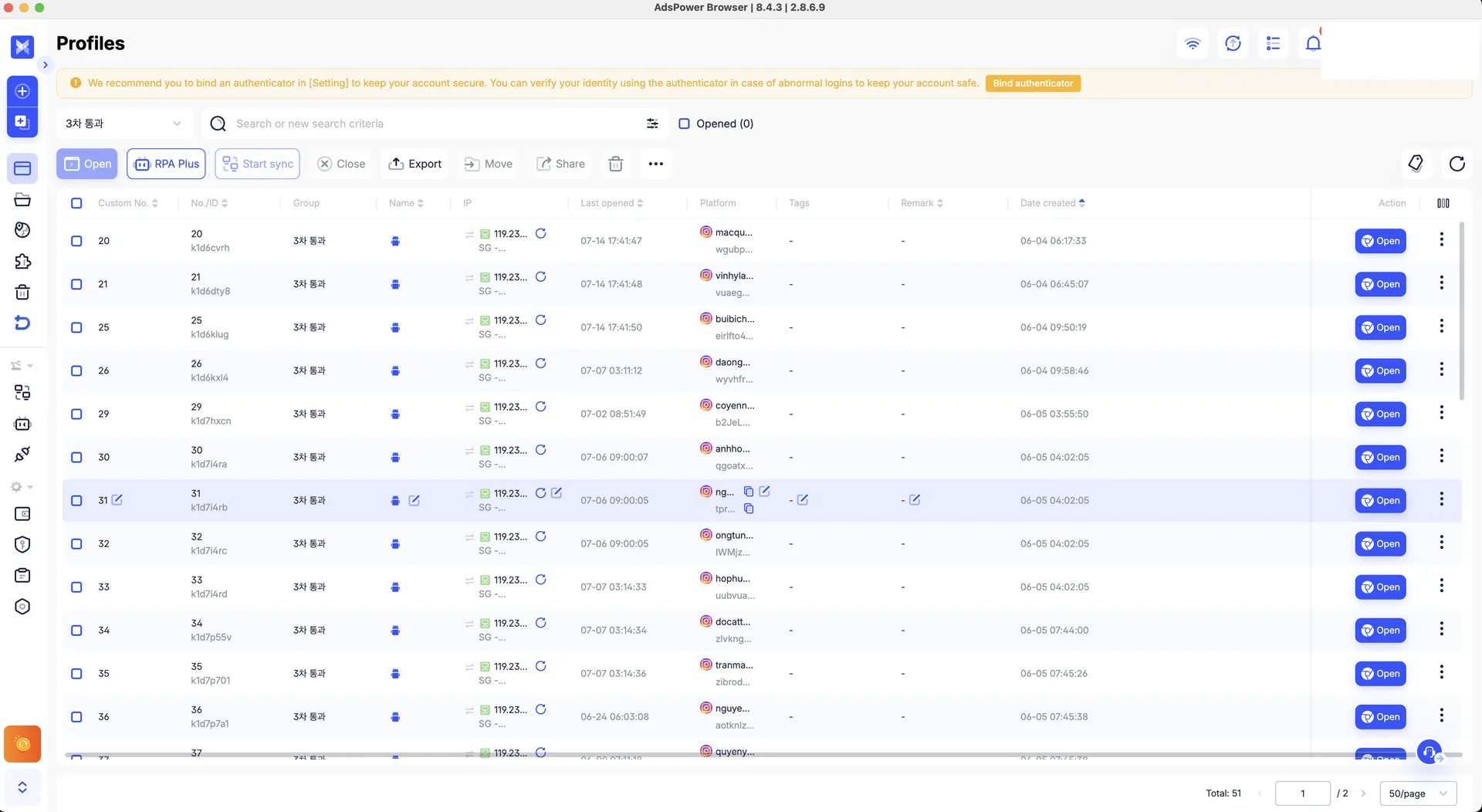
Isolate accounts at the profile level. The host IP is almost irrelevant. Each AdsPower profile gets its own mobile proxy and fingerprint so the accounts don’t get linked.
-
Manufacture “human-ness” at three layers. Network (proxy), behavior (click/typing rhythm), and time (when you comment) — all of them.
One thing to state upfront: attaching reactions to your own posts with multiple accounts is a gray area under platform ToS. So I’m keeping this as a record of how the system was designed, not as “detection-evasion tips.” What’s proven and what isn’t is laid out honestly at the end.
1. Why it’s built this way
When Part 2 generated a post, it produced not just the body but three comments as well. You have to know the body’s speaker and angle to write a natural counter-argument from the opposite side. So the remaining question was singular: who posts these comments?
Three unavoidable constraints drove the whole design.
First, if the main account replies to its own post, that’s not a conversation — it’s a monologue. A reaction only means something when a different voice joins, so comments belong to sub-accounts.
Second, the official Threads API cannot comment on arbitrary posts. The API is oriented toward managing your own conversations, so it doesn’t expose a path for replying to or reposting an arbitrary public post. Part 1’s conclusion repeats here — the only route left is driving a browser directly.
Third, and this is the biggest one, if you run multiple accounts on the same IP with the same fingerprint, the platform soon lumps them into a single operator. When one gets caught, the linked ones die together. So the real assignment of this project wasn’t the technique of commenting, but how to make the accounts look like strangers to one another.
2. Architecture — splitting the brain from the hands
Why two machines
At first I tried to put the browser on hermes (the publishing component), but I dropped that quickly. hermes is a container that runs publishing and KPI collection 24/7. Loading five or six browsers onto it blows up memory — the container is capped at 5GB and the VPS has zero swap, so there’s no headroom. Decisively, the VPS is a datacenter IP, which is the worst case for account isolation. Engagement belonged in a separate worker.
So I split the roles across two machines.
[Hostinger VPS] publishing brain (main account) + DB (sole SQLite owner) └ engagement_jobs queue + jobq.py (thin access layer) ▲ claim(select due jobs) / report(results) │ Tailscale private net (100.x) — jobq called over SSH ▼[Mac mini M4] engagement worker (launchd/cron, always on) ← hands └ pull due job → AdsPower open-browser → CDP(ws.puppeteer) → Playwright → like/comment → report result → close-browser └ per-profile Singapore mobile proxy / 1 action per account / random delayThe DB is owned solely by the VPS. SQLite is a file, so concurrent remote writes from several places are unsafe. So the Mac mini never touches the DB directly; it calls the VPS’s jobq.py over SSH to claim jobs and report results. Queuing, atomicity, and consistency all happen in one place — the VPS.
The access path is kept thin, too. jobq.py is not an always-on service but a CLI invoked ad hoc via docker exec. What’s interesting is that this is the same pattern as Part 1, only reversed in direction: back then the hands (Mac mini) pulled data up; this time the hands push actions out.
The two machines are joined on a Tailscale private network, so SSH works from anywhere without opening a public port. Splitting it this way physically separates the datacenter IP of publishing from the mobile IP of engagement. The brain, which needs stability, sits on a server; the hands, which need isolation, sit on the mobile-line side.
The host IP isn’t what matters
Counterintuitively, the Mac mini’s own IP means almost nothing for isolation. The unit of isolation is not the machine but the AdsPower profile.
sub_account A ─ AdsPower profile A ─ mobile proxy A (Singapore) + fingerprint Asub_account B ─ AdsPower profile B ─ mobile proxy B (Singapore) + fingerprint B … … …(all on the same Mac mini, but the IP/fingerprint/cookies the platform sees differ per profile)AdsPower gives each profile its own browser fingerprint (UA, canvas, WebGL, timezone…), a dedicated proxy, and a cookie store. So even with several profiles open on one machine, to the platform they are different devices on different lines — different people.
Secrets like passwords aren’t held by our code. AdsPower keeps them, and our DB keeps only the mapping.
sub_accounts(account, adspower_profile_id, cohort, proxy_tag, status, last_action_at, …)load_sub_accounts.py takes only the JSON AdsPower exports (account name, profile ID, proxy tag — no secrets) and UPSERTs by account. Passwords, 2FA, and proxy credentials are never stored in the DB. The worker only asks, “open this profile.” The loader is idempotent, so rerunning it never revives a profile you’ve already paused.
The proxy rotates its IP roughly every 30 minutes. We use this as an asset, not a weakness: when a job fails, the retry is deferred by 20–45 minutes so the next attempt goes out on a fresh IP past the rotation. A job stuck on a dead IP automatically gets a new line. (Retries are covered again in section 4.)
Who posts which comment
One thing was undefined at handover: the three comments were generated alongside the body, but which comment which account posts was nowhere in the DB. The storage format was even mixed between two kinds — a marker form like "comment1: … comment2: …", and three paragraphs separated by blank lines.
I sorted it out in two steps.
First, I unified the format. A parser that reads both formats splits the combined text into individual comments and stores them as comment_items rows. From then on the queue operates on a single comment, not a “clump.”
Second, assignment isn’t fixed. Instead of hard-coding “this comment goes to this account,” when jobs are enqueued they draw from an active pool of about 80 accounts on the fly. It prioritizes the least-recently-used account (by last_action_at) with a dash of randomness, and excludes any account that already has a pending job. This keeps a single account from being assigned to two posts at once.
As a result, “who posts” becomes the outcome of runtime rotation rather than a predefined table. A useful side effect: no correlation forms in which a given sub-account always reacts to the same target (a linkage tell).
The actual output looks like this. On one post, three accounts argue different positions (account names anonymized):
- A (pro-new-car): “At that price and finish it’s the better buy — the 1.5 turbo beats the rival’s 2.0 NA”
- B (realist): “No way it beats the service-and-parts network. Depreciation’s hopeless too”
- C (alternative): “For that money I’d take a certified pre-owned from another brand. Low recognition means a headache at resale”
The three comments come from different accounts on different IPs, and their positions don’t overlap. The goal is to manufacture a “conversation,” not a tidy information summary. The persona axis set up in Part 2 bears fruit here.
The engagement type (like-only, comment-only, both, or none) is chosen per post by the operator in Discord (reusing Part 2’s clarify). “Both” is a single job in which one account comments and then likes a few seconds later within one session — natural, since it’s the same IP and same session. Actions per account are capped at one.
3. Commenting like a human — browser automation
From here on it’s the story of the “hands” that received a job actually opening a browser.
Attaching to the browser via CDP (and the mouse.click trap)
First, a common misconception: AdsPower’s CLI or MCP alone cannot drive the browser. open-browser only opens the profile; it doesn’t provide operations like navigate, click, or fill. Instead, its response returns a CDP endpoint directly.
r = requests.get(f"{API}/api/v1/browser/start", params={"user_id": pid, "headless": 0}, headers={"Authorization": f"Bearer {KEY}"}).json()ws = r["data"]["ws"]["puppeteer"] # CDP endpoint AdsPower handed backb = p.chromium.connect_over_cdp(ws) # don't guess the port — connect to the returned valuepage = b.contexts[0].pages[0]Since the browser is AdsPower’s, Playwright doesn’t even need to install its own. But here comes the most expensive lesson.
Trying to look human, I reached for page.mouse.move → click — a real click at coordinates — and got stuck for a long while. On the CDP layer AdsPower interposes, the mouse events just hang with no response. The fix was to split operations into two lanes. Navigation goes through goto or focus + Enter instead of coordinate clicks; buttons (like, reply, post) use a JS click (el.click()) instead of coordinates; scrolling uses window.scrollBy instead of mouse.wheel.
I let go of the ideal of a “human-like coordinate click.” Instead I rebuilt human-ness on top of what the environment actually allows. Even with coordinate clicks blocked, human-ness comes out of timing, order, and the discovery path (the next two subsections). It’s the same lesson as Part 1’s “what beats anti-bot isn’t Playwright, it’s a real browser” — design to the constraints of the environment, not to the ideals of the driver.
How you reach the post — search and scroll, not a direct URL
The URL of the post to comment on is all in the DB. The easiest implementation is to goto that URL directly, but I deliberately didn’t.
People don’t arrive at an unfamiliar post by typing a deep link. They get there by searching, by tapping into a profile, by scrolling the feed. A direct URL jump is itself a bot signal. So I mimicked the discovery process like this.
1) search by topic keyword (e.g. a brand keyword — never type the handle "@main" directly)2) enter the @main profile that surfaces in the search dropdown3) scroll in chunks through the profile until the target post (the code at the URL's tail) appears → open the post → (read) → like/commentIt neither searches the handle exactly nor jumps straight to the target post. Search by topic keyword, enter the surfaced profile, and meet the post by scrolling. The path itself resembles a human’s browsing trajectory. The target post is caught the moment it appears mid-scroll via the a[href*='<code>'] selector.
The fine rhythm — the behavior layer
Even with a human-like path, if each individual action is mechanical it shows. So every interaction has a human-behavior layer on top.
-
Reading time is proportional to post length. On open, it measures the actually-rendered character count (
article.innerText.length) and computes dwell time at a Korean skimming rate (~10–16 chars/sec), clamped to 2.5–22s. Short posts get read quickly, long ones slowly. -
Scrolling in chunks, with occasional rewind. It moves 300–720px at a time, pauses to “read,” and 15% of the time nudges slightly back up. Constant-speed scrolling is something humans never do.
-
A beat before clicking. Even for buttons it hovers, hesitates briefly, then clicks. The click itself is JS, but the delay around it expresses a human’s decision lag.
-
Typing as if thinking. A comment is never pasted at once; it’s typed in sentence/phrase chunks (55–150ms per char) with 0.3–1.1s “thinking” pauses in between.
-
No abrupt exit. After the action it lingers 1.5–4s, sometimes scrolls once more, then leaves.
The point is that it’s not just randomness, but randomness conditioned on context. Dwell time tracks post length, typing breaks at sentence boundaries, scrolling hesitates when it meets the target. It has to be variation that reacts to content, not uniform noise, to look human.
Time is a fingerprint too — when you comment
Part 1 talked about the TLS fingerprint — that bots get exposed at the connection layer. Engagement automation has a time-axis version of that. If reactions are regular, that regularity itself becomes a fingerprint of coordination. If three accounts comment at exactly 5, 10, and 15 minutes after publishing, always on the minute, the pattern gives the bot away no matter how natural the content is.
So the scheduler deliberately breaks up regularity.
-
The first comment is random within
[2 min, window (e.g. 40 min)]after publishing. Each subsequent account isprevious job time + [0, 2h40m]random, but scattered by the second, not the minute. No fixed interval, no on-the-hour. -
There is a floor, though. The first comment can’t go out until at least 2 minutes have passed. A 0-second reaction right after publishing is an obvious bot signal.
-
Posts that are too old are left alone (48 hours by default). The anchor is
max(published_at, now), which also prevents a stale backlog from firing all at once. -
Accounts, too, use the rotation described earlier (least-recently-used first + randomness + excluding pending ones), so it breaks regularity on the account axis as well as the time axis.
The reason for second-level granularity: cutting at the minute (5 min, 10 min) is itself a grid pattern. Scattering by the second gets closer to “someone happened to see it then.” Since there’s a single worker, execution is sequential anyway (about one job per 180s), but the point is to spread the distribution of scheduled times.
Conclusion
Idempotent queue and retries
The hands (Mac mini) can die at any time (disk, proxy, login expiry), and browser automation is inherently brittle. So the queue is built to be safe to rerun — idempotent. I brought over the atomic claim from Part 2’s publish worker as-is.
-
To claim a job, it runs
UPDATE … SET status='claimed' WHERE id=? AND status='pending'. Thanks to theWHEREguard, two workers can’t grab the same job at once. -
A
pendingjob whosescheduled_atis more than 24 hours overdue isn’t executed but markedexpired. This prevents a worker that was down for a long time from dumping the backlog all at once when it comes back (a bot burst). -
Retries cap at four. On failure it re-enqueues 20–45 minutes later, and that delay crosses the 30-minute proxy rotation so the retry goes out on a fresh IP. One dead IP never permanently fails a job.
-
When done, the result is recorded via
report(done/failed) andlast_action_atis updated. Comment success/failure is announced to that post’s Discord thread; a like success passes silently. If alerts are too noisy you stop looking at them.
What works, and what’s still open
In the same spirit as Part 2, I separate what’s proven from what isn’t.
-
This is attaching reactions to your own posts with multiple accounts, so under platform ToS it’s a gray area. That’s why I keep it as a system-design record, not “detection-evasion tricks.” Isolation, queue, idempotency, and pacing are ordinary distributed-systems techniques on their own, and the real risk management here is account isolation (so one blowing up doesn’t spread to all).
-
What’s proven is that the pipeline runs end to end: publish → enqueue → queue → the Mac mini likes/comments for real over CDP → report. The
mouse.clickworkaround, the search-and-scroll discovery, and the idempotent retries all actually work. -
What’s still open is effect. Whether these reactions genuinely lift reach or conversion is unknown — the sample is too small. As in Part 2, I won’t claim results yet.
What I learned
-
The bottleneck was never generation. Across Part 1 (network), Part 2 (content/measurement), and Part 3 (behavior/time), the hard part was “looking human,” and the LLM was the easiest piece of it.
-
In the end you design to the environment, not the ideal. The
mouse.clickhang forced me to abandon the clean design (coordinate clicks), but it taught me that human-ness comes from timing, order, and path — not from the click method. -
The unit of isolation is the profile, not the machine. Delegating isolation to per-profile proxy, fingerprint, and cookies — instead of fussing over the host IP — made “N accounts on one machine” safe. The secrets are held by AdsPower, not the code.
-
Next is to wire engagement results into Part 2’s attribution (engagement → click → conversion) and close a learning loop over which persona/timing combinations actually lead to real clicks.
A build log from a Threads marketing agent (Hermes) in actual operation. Feedback welcome.
Comments