
Reducing Deployment Bottlenecks: From CI Queues to Docker Image Builds
As PR updates and dev merges accumulated, CI queue time reached a daily p90 of 51m 13s. I used operational records to examine the changes after expanding a shared Mac runner pool and distributing image builds.
On this page
Introduction
I built CI and deployment infrastructure for WITIM: a monolithic Next.js web application, a Tauri desktop app, and Flutter mobile apps. Designers and product planners contributed code alongside developers, and every PR had to pass CI before it could merge into dev.
When we moved web CI to self-hosted runners in late September, the default runner was a single Mac mini. Web CI, Flutter mobile builds, and macOS desktop signing and notarization shared its execution slot.
PR updates and dev merges both triggered checks. These bursts were visible on the morning of September 28. On the busiest day, October 27, the daily median wait before execution was approximately 12m 57s, with a p90 of 51m 13s. Some jobs waited nearly an hour before testing even started.
Web Dev image builds and pushes also ran on Vultr. Treating CI waits and deployment image builds as separate bottlenecks, I first expanded the shared Mac pool, then distributed web and admin image builds.
1. Understanding how PR checks accumulated in the queue
September 28, 10:00–14:00, saw 13 PR checks and two dev push checks; on October 14, four PRs merged into dev within roughly 58 minutes. PR checks included updates to existing PRs. Requests arriving before running jobs finished could build up a queue.
The table covers September 28 and the two days with the highest daily p90 in the pre-expansion period, September 26–October 27. Each row includes the full day of completed Mac root jobs. Queue time measures job creation to execution start for web CI jobs without upstream dependencies. The p90 is the value at or below which 90% of observations fall.
| Date (2026, KST) | Root jobs | Daily median wait | Daily p90 wait |
|---|---|---|---|
| Sep 28 · Request burst | 57 | 3m 48s | 17m 44s |
| Oct 14 · Second-highest p90 | 70 | 9m 59s | 25m 6s |
| Oct 27 · Highest p90 | 62 | Approx. 12m 57s | 51m 13s |
The Mac mini had one runner executing one job at a time. If another PR check or app build was running, the next check had to wait, delaying the merge of any PR that needed its CI result.
I thought parallel PR checks could reduce waits for earlier jobs to finish, so I started by adding execution slots.
2. Sharing web CI, Flutter, and macOS builds across three machines
2-1. A shared pool instead of dedicated machines for each workload
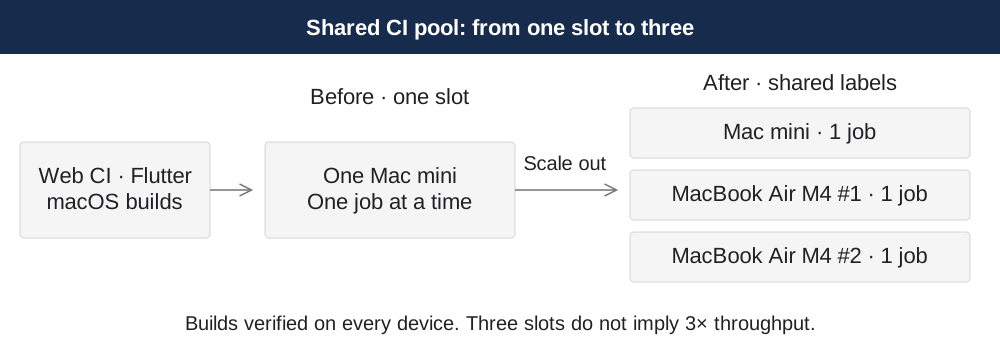
I combined the existing Mac mini with two MacBook Air M4 machines, each with 16GB of RAM, so that multiple machines could handle both web CI and actual Flutter and macOS desktop builds. Any machine needed to produce signed Flutter IPA and AAB artifacts, as well as signed and notarized macOS ARM and Intel apps.
With one concurrent job per machine, one could handle a mobile build while another ran web checks or a desktop build. A shared pool let idle machines absorb demand instead of assigning each device to a fixed workload.
| Workload | Shared labels | Work all three machines could handle |
|---|---|---|
| Web CI and PR checks | witim-builder | Type and static checks, Vitest, production pre-build |
| macOS desktop | witim-builder | ARM and Intel builds, signing, notarization |
| Flutter mobile | witim-builder or witim-mobile-builder, depending on the workflow | Tests, iOS simulator builds, signed IPA and Android AAB |
All three machines received both shared labels, and each job used the labels required by its existing workflow. Linux database tests, Vultr deployments, and Windows builds remained outside this pool. The structure changed as follows.
2-2. Preparing tools, services, and signing environments
I used the Mac mini as the reference for the new MacBooks’ runner accounts, services, tools, and signing configuration.
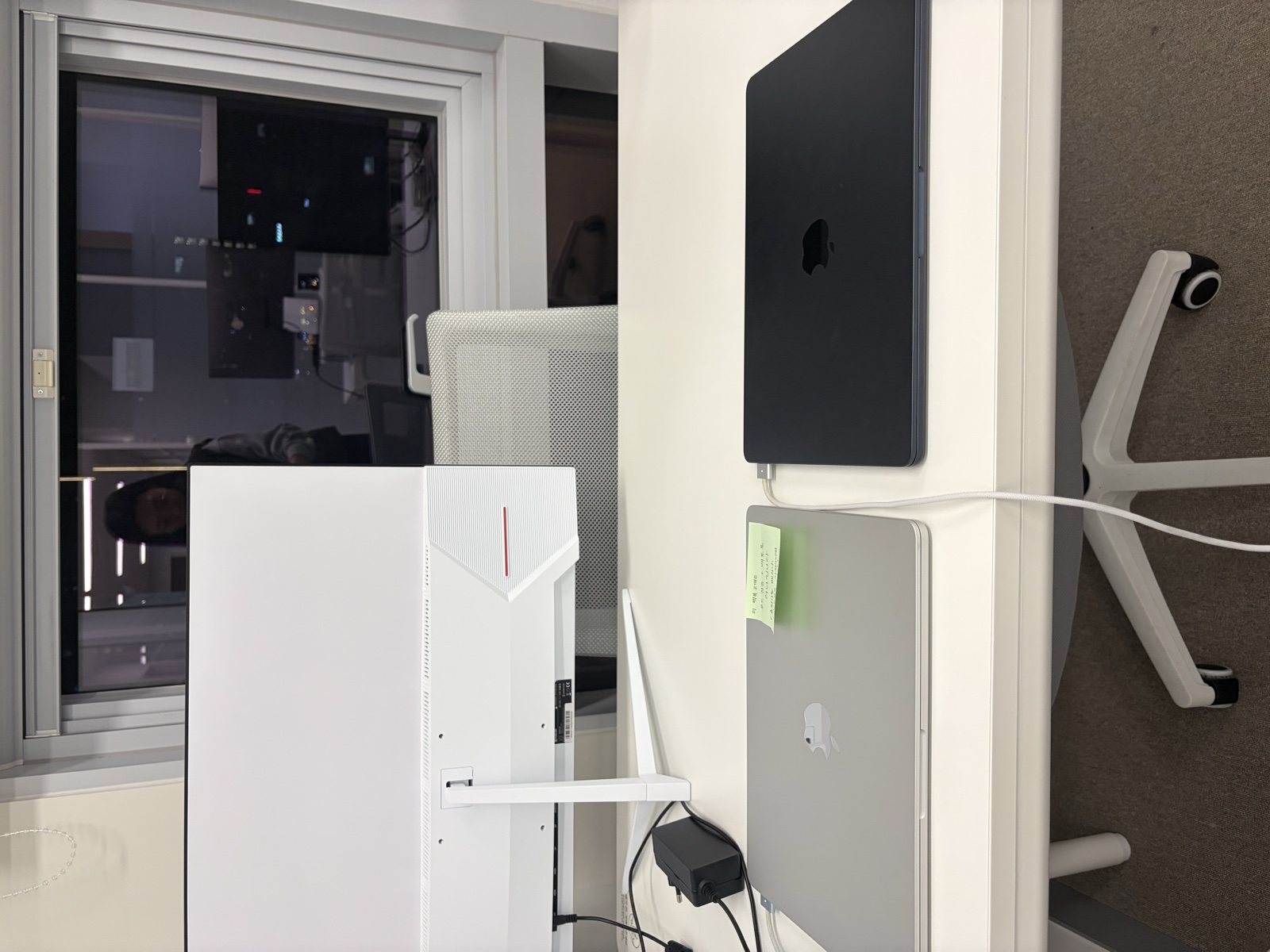
Photo 1. The two shared CI MacBooks. The MacBook dedicated to web Docker image builds, discussed later, is a separate machine.
I matched compatibility-sensitive tools such as Xcode, simulator runtimes, and CocoaPods. Existing workflow setup steps prepared Flutter, Java, Node, and Rust. I installed each runner as a LaunchAgent under an account separate from personal work, and corrected missing PATH entries and an incorrect DEVELOPER_DIR in the service environment. A command working in a terminal did not mean the build would work as a service.
Signing credentials were not permanently copied to each machine. The existing workflows used GitHub Secrets to prepare temporary keychains, profiles, and Android keystores, then cleaned them up. While validating this flow under dedicated accounts, I resolved profile download failures caused by unaccepted Apple terms and a missing Developer ID intermediate certificate.
2-3. Validating signed mobile and desktop builds before joining the pool
The MacBooks initially received test-only labels. I ran mobile, desktop, and web Actions without changing application source code, excluding store uploads, update-channel publication, and server deployments.
Both MacBooks passed iOS IPA and Android AAB signing, macOS ARM and Intel signing and notarization, and web CI. I checked desktop artifacts with codesign and stapler. Despite differing macOS versions, a machine received the shared labels only after its actual artifacts had been verified. Joining the pool required successful builds and signing checks, not just installed tools.
2-4. Comparing queue times after the move to self-hosted execution
I reviewed September 26–October 31 records of self-hosted execution. For web CI, I aggregated waits for Mac root jobs that completed with success or failure on the first push or pull_request attempt. For mobile and desktop workloads, build and signing checks established that the additional machines could handle them.
The pre-expansion data also includes jobs handled by a personal Mac. I excluded October 28–29, when testing and pool admission were underway, and compared the periods before and after the shared pool was established.
| Observation period (2026, KST) | Configuration | Root jobs | Median wait | p90 wait |
|---|---|---|---|---|
| Sep 26–Oct 27 | Existing Macs, including some personal Mac execution | 1,240 | 2m 30s | 13m 34s |
| Oct 30–31 | Three-machine shared pool established | 136 | 10.5s | 5m 52s |
The observed median decreased by 93.0%, and p90 by 56.8%. The share of jobs waiting more than 10 minutes fell from 15.6% to 1.5%.
3. Could an ARM MacBook build amd64 web images?
Reducing CI waits left another bottleneck: web and admin image builds were still concentrated on Vultr. I added one dedicated MacBook Air M4 with 16GB of RAM to share that work. It was separate from the two shared CI MacBooks. First, I needed to verify that an ARM Mac could build images for the Linux amd64 server.
3-1. Building Next.js on ARM and assembling an amd64 runtime image
WITIM’s web code currently has a monolithic Next.js architecture.
Emulating the entire build as amd64 would add translation overhead to the expensive Next.js compilation. Instead, I used Buildx in OrbStack’s Linux ARM64 environment to build Next.js on ARM and assemble the output into an amd64 runtime image. The builder used FROM --platform=$BUILDPLATFORM node:22-slim; the runner and migrator images contained amd64 Node and native dependencies.
Unlike JavaScript, HTML, and CSS, native files such as sharp and Prisma engines had to match the architecture. Two issues surfaced.
| Issue | Cause and response |
|---|---|
| Web build OOM | I raised OrbStack memory from roughly 8GiB to 10GiB and limited BuildKit with max-parallelism=1. |
| sharp failed to load in the amd64 image | ARM versions of sharp and libvips had been included. I added the matching x64 package versions in the final stage. |
3-2. Verifying compatibility and Dev deployment
An amd64 image label alone was not enough to establish compatibility. I ran the container with --platform linux/amd64 --network none and tested sharp image conversion and Prisma engine loading. Migrations were bypassed at this stage, so this was separate from testing real database queries.
After verifying Registry uploads, I registered the Mac as an Actions runner. Both web and admin completed Mac builds and runtime checks → Vultr Dev deployment, smoke tests, and traffic switching. I compared performance using actual Actions records rather than local rebuilds with cached artifacts.
4. Distributing builds and serializing deployments
4-1. Preferring an idle Mac without double-booking it
If the Mac was already building or offline, the request used Vultr. Separate build requests were assigned to either Mac or Vultr; a single build was not split across both machines.
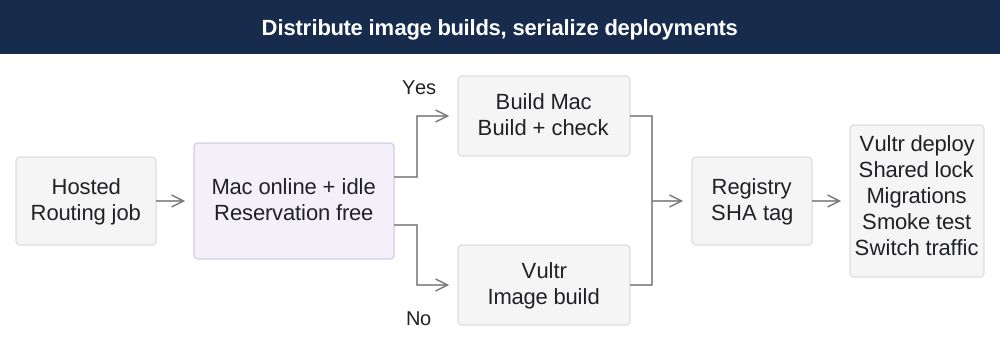
Even when the Mac appeared online and idle, simultaneous requests could both select it. I updated a reservation file on a dedicated branch through the GitHub Contents API, using the existing SHA as a condition for the update, so only one request could acquire the reservation. Reservations recorded the run, attempt, and application, expired after 75 minutes, and were reclaimed for completed or canceled runs. Builds had a 60-minute timeout.
4-2. Preparing images in parallel while applying server changes sequentially
Routing and reservation release ran as short GitHub-hosted jobs. This allowed a later request to select an idle Mac even when Vultr was busy building.
After image upload, a deployment lock shared by web and admin serialized migrations, container replacement, smoke tests, and traffic switching on Vultr. Images used commit SHA tags, and ordering checks prevented an older build that finished late from overwriting a newer deployment.
The existing Registry cleanup deleted tags in lexical order and could remove an image still waiting for deployment. I removed that cleanup and consolidated server changes into one job per application. Preparing builds in parallel also required managing deployment order and image retention.
4-3. Lower medians, but deployment waits remained on Vultr
I compared successful first-attempt dev push runs. The baseline contained 53 Vultr builds from Oct 29, 16:31 to Nov 4, 18:55; the initial distributed period contained 13 runs from Nov 4, 18:55 to Nov 8, 03:17, all in KST. Runs after subsequent pipeline changes were excluded.
| Metric | Before | Initial Mac/Vultr distribution | Change |
|---|---|---|---|
| Build/push median | 16m 58s | 6m 27s | 62.0% decrease |
| Full workflow median | 33m 5s | 26m 34s | 19.7% decrease |
| Build/push p90 | 18m 12s | 22m 3s | 3m 51s increase |
| Full workflow p90 | 56m 5s | 60m 35s | 4m 30s increase |
Build time refers to the Build and Push (pnpm cache) step; full workflow time also includes CI, waiting, and deployment. After distribution, the 11 Mac builds had a median build/push time of 6m 17s, while the two Vultr builds took 22m 3s and 23m 12s. A slower path remained. With 13 samples, p90 is the second-longest value; its increase is not a general performance degradation rate.
Images could be prepared concurrently, but deployments still converged on one Vultr server. On November 6, Mac and Vultr build/push steps overlapped for 1m 41s. Yet after the Mac image was ready, its deployment job waited 18m 29s while Vultr finished building. Median times improved, but using the deployment server for builds still caused resource contention.
Conclusion
The starting problem was checks waiting for an execution slot as PR updates and dev merges accumulated. After establishing the shared Mac pool, the observed median wait fell from 2m 30s to 10.5s, and p90 from 13m 34s to 5m 52s. This depended on validating that every machine could run CI tests, build mobile and desktop apps, and perform signing and notarization.
For web builds, I verified the path from ARM compilation to amd64 images and distributed requests across Mac and Vultr. Separate dev requests did build images concurrently; median build/push time decreased by 62.0%, and median full workflow time by 19.7%. But even when an image was ready on the Mac, a Vultr build could delay its deployment. Build medians improved, but resource contention on the deployment server remained.
Comments