
Rehearsing an NCP Account Migration: What I Verified Without Disrupting Production
How I rehearsed an NCP account migration with production data, verified data consistency, application behavior, and worker isolation, and checked the results of the actual cutover.
On this page
- Introduction
- 1 Reading the Production Database Once, Then Testing Copies
- 2 Verifying the Data Separately from the Copy Command’s Success
- 3 Checking Whether Requests from the New Application Reached Production
- 4 Problems the Rehearsal Actually Exposed
- 5 Results of the Actual Cutover on October 23
- Conclusion
Introduction
After choosing a data migration approach, I rehearsed with production data before the actual cutover. The goal went beyond checking whether copying worked: I needed to measure the maintenance window and find and resolve problems before encountering them for the first time on cutover day.
In Part 2, I chose to dump and restore PostgreSQL and Redis, with a brief pause in writes. The estimated maintenance window was 15–20 minutes. But knowing the restore duration alone was not enough to predict the total downtime. Starting the new application, checking database connections and chat and file features, and switching traffic would also take time.
The bigger concern was encountering an unexpected error for the first time during the cutover. If a PostgreSQL extension stopped the restore or the new application sent requests to the old messaging server, I would have to investigate while users could not access the service. Even with correctly migrated data, a single incorrect setting could prevent the cutover from finishing.
I therefore ran through the same sequence as the final cutover in advance, using actual production data. There were three things to check: whether the data and application features worked correctly, how long the cutover would take, and whether any problems would block the work that day.
The verification process itself could not become an incident. The restored database contained real user information, and the copied configuration included secrets for accessing push notifications, email, and file storage. To prevent tests in the new environment from reaching production users, I blocked changes to the production database and restricted what the rehearsal application could access.
1. Reading the Production Database Once, Then Testing Copies
I first checked that automated backups were working. I took one read-only dump of the production database and used that file for subsequent restores and tests. There was no need to repeatedly connect to the production database or modify its schema.
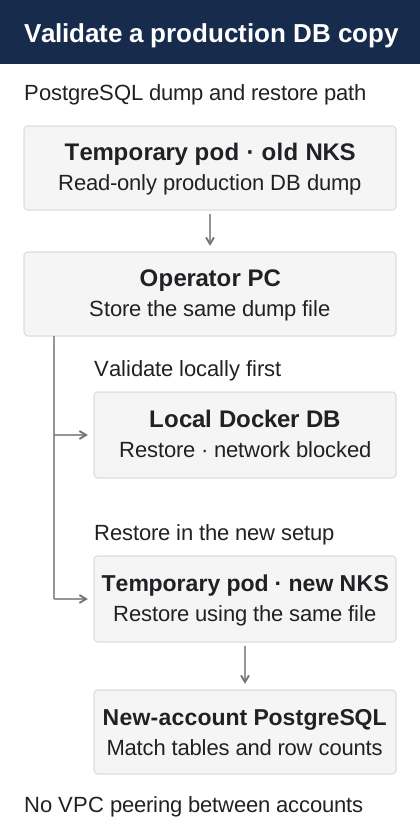
I did not set up VPC peering between the old and new accounts. The managed databases were accessible only from the NKS node address ranges, so I ran the dump and restore in temporary pods inside the respective clusters and transferred the file with kubectl cp. The operator’s computer served as the place to inspect intermediate files and verification results. Given the small data volume, this was simpler than establishing a permanent connection between accounts.
I first restored the file from the production database into a local Docker database and checked it there. I blocked this container’s network access so it could not connect to other environments, then restored the same file into the new account’s database. The purpose of this sequence was to avoid touching the production database again, even if repeated tests failed.
I also added checks to the scripts to prevent mistakes. They prohibited selecting the source cluster as a restore target and compared the Kubernetes API server address, PostgreSQL server identifier, and Redis run_id to check whether the source and target were the same. I kept a separate kubeconfig file for each cluster. Even if the new environment’s configuration was wrong, there was no direct network path to the production database.
2. Verifying the Data Separately from the Copy Command’s Success
I passed PostgreSQL connection details to the temporary pod through a Kubernetes Secret rather than putting them in the command line. The source session used the read-only option:
PGOPTIONS='-c default_transaction_read_only=on'I created the dump with pg_dump -Fc. Because the application account in the managed database could not install extensions, I prepared the extensions in the target database beforehand and excluded their installation entries from the dump’s table of contents. I also did not carry the old database’s ownership and permissions over unchanged to the new account. The restore ran in a single transaction with pg_restore -1 --exit-on-error, preventing a failure halfway through from leaving only part of the restore applied.
I did not judge completion by the exit code alone. I compared the table lists and the exact row count of every table in the source and new databases, and a mismatch prevented the next step from running. All 285 tables matched during the rehearsal. With roughly 500,000 rows, the cost of using actual count(*) queries rather than statistical row estimates was manageable.
Equal row counts do not, of course, prove that every record has identical contents. I therefore combined several checks: restoring the same dump, stopping immediately on any restore error, and comparing table and row counts. The process did not depend on a success message from any single step.
For Redis, I did not select only some sessions to migrate, either. In addition to login information, Redis held data such as usage statistics that existed nowhere else. I used DUMP and RESTORE with the same Redis version and carried over the remaining expiration time with PTTL. I then compared key counts.
3. Checking Whether Requests from the New Application Reached Production
Before opening the new environment to users, I changed only /etc/hosts on the operator’s MacBook. Only that computer connected to the new load balancer; real users’ requests continued to go to the old NKS cluster. I used only an operations team account and a personal test account, checking login, chat, file uploads, and administration features in a conversation containing just those two accounts.
External services copied through environment variables, such as file storage, could still point to actual production resources. I therefore limited the test files and accounts and removed the files after checking them. Leaving DNS unchanged did not eliminate every possible external effect.
Workers required more care. Unlike the web application, they could begin processing scheduled jobs stored in Redis as soon as they started. To keep a worker with production data and the same Secrets from sending duplicate push notifications or emails, I blocked external communication with a Cilium NetworkPolicy, allowing only the internal communication needed for testing, such as access to the new database and Redis. I started the worker only after checking that the policy actually blocked external requests.
I did not assume that applying a policy meant isolation was working. Before starting the worker, I verified from the pod that external communication was blocked, then checked whether the application could use its internal database and Redis normally.
During the rehearsal, the worker ran for 19 minutes and processed about 650 jobs across 13 queues, with no database or Redis errors. Since external calls were blocked, however, those results could not prove successful push notification or email delivery. I distinguished what the rehearsal could verify from what would need to be checked after the actual production cutover.
4. Problems the Rehearsal Actually Exposed
The rehearsal revealed three unexpected problems. Each could easily have gone unnoticed if I had judged the environment by its outward appearance or checked only whether a command succeeded. For each, I recorded which test exposed it and how and when I addressed it.
4-1. Messages from the New Web Application Were Published to the Old Centrifugo
When I connected to the web application in the new account and tested chat, messages were being published to the old production Centrifugo rather than the new cluster. The copied CENTRIFUGO_API_URL still pointed to the old service’s public address.
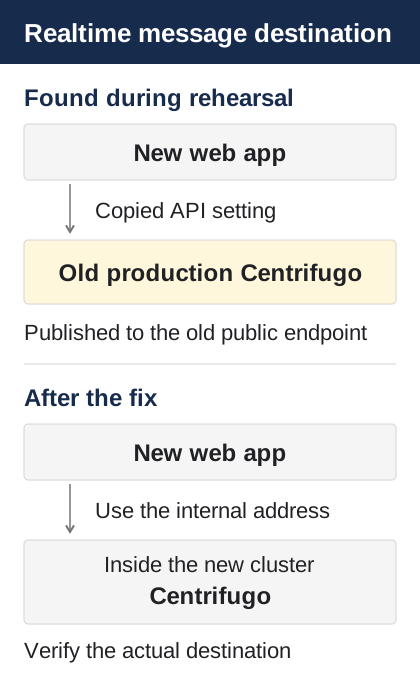
The new web application started normally, and login worked. But real-time messages were published by the web server through a separate Centrifugo API. Changing only the web application’s entry address did not establish which real-time server received the messages. Checking that route separately exposed the incorrectly copied setting.
Had I cut over in that state, the web application and database would have used the new account while message publishing continued to target the old one. The new cluster’s real-time connections and the actual message route would not have aligned, leaving chat delays or delivery errors to investigate on cutover day.
I changed the setting to Centrifugo’s internal address in the new cluster. On the actual cutover day, I also checked that messages appeared immediately. This added a simple criterion to the rehearsal checklist: check the actual connection targets of internal dependencies, as well as whether the service is running.
4-2. PostgreSQL Extension Schemas Caused the First Restore to Fail
The first PostgreSQL restore also failed. The vector and pg_stat_statements extensions were installed in the NCP managed database’s cdb_admin schema rather than the schema the script expected. Preparing the extensions in the target database beforehand was not enough to resolve the schema difference during restoration.
The initial script assumed that the rest of the restore would proceed normally once extension installation statements were excluded. But in managed PostgreSQL, the accounts and schemas available for installing extensions can differ from a typical environment. Preparing the same PostgreSQL major version did not mean the managed service’s internal configuration would be identical.
I modified the existing restore runner to read extension schema information from the dump file and handle it accordingly. After the change, I restored the data again and checked that row counts matched across all 285 tables. I verified that the original acceptance checks passed again, rather than merely confirming that the error had disappeared.
Had I encountered the same error for the first time during the production cutover, I would have had to investigate and retry the restore while writes were stopped. This confirmed that migration scripts need to be tested with real dumps against the target managed database’s particular behavior, as well as checked for correct syntax and options.
4-3. Redis Still Had 699 Keys from an Earlier Rehearsal After Overwriting
For Redis, the copy command succeeded, but the source and target key counts did not match. redis-import --replace overwrites keys with the same name, but does not delete keys that exist only in the target. The target still contained 699 keys created during an earlier rehearsal.
The cause was a mistaken interpretation of what copying meant. replace means replacing conflicting keys; it does not mean making the entire target Redis instance identical to the source. Repeated rehearsals could leave keys accumulating in the target. This would have been difficult to discover if I had treated a command completing without errors as proof of identical data.
Redis held more than cache data. It also contained login sessions, mobile session pointers, and usage statistics whose state needed to match at the time of restoration. I found the discrepancy because I had added a separate key-count comparison after the copy.
Although I discovered this during the rehearsal, the copy tool was not fully fixed until after the production cutover. On cutover day, I manually compared and removed the leftover keys, ultimately verifying that 9,587 keys matched. Afterward, I changed the runner from “overwrite existing keys” to “clear the target, then restore.”
Discovery, the temporary response, and the permanent tool fix did not all happen at once in this case. Finding a problem during rehearsal should not be described as though every fix had been automated in advance. Manual verification on cutover day and the subsequent tool improvement served different purposes.
The three problems had different causes: an old service address left in an environment variable, extension schemas in managed PostgreSQL, and an assumption about Redis’s replace behavior. But they were all problems I would have missed without explicitly verifying the success conditions.
What the rehearsal established was more specific than “the data copy can run.” Does the new web application use the new real-time server? Does restoration on the managed database pass all the way through row-count comparison? Are any keys left in Redis that do not exist in the source? I strengthened the cutover-day checks around those questions.
5. Results of the Actual Cutover on October 23
After the rehearsal, I returned the new application to standby. For the actual cutover, I stopped writes to the old service at 23:59 on October 22 and performed the final PostgreSQL and Redis copy from 00:01 to 00:05 on October 23. I started the new application at 00:06 and switched the Cloudflare entry point at 00:12.
| Check | Result |
|---|---|
| PostgreSQL | 285 tables and 495,192 rows matched |
| Redis | 9,587 keys matched |
| User impact | About 13 minutes |
| Web requests in the first hour after cutover | 5,518 requests, zero 5xx responses |
| Worker jobs during the same period | 1,926 succeeded, zero restarts |
I also checked that users remained logged in on web, desktop, and mobile, and that real-time chat, files, and push notifications worked. Data transfer had taken about two minutes in the rehearsal, but the actual cutover also included stopping and starting applications and checking their features, so the total impact lasted longer.
The 13-minute figure was not the only thing that mattered. I had criteria for comparing the source and target data and had decided in advance which stage to stop at if a problem occurred. After completing the cutover, I continued with separate deployment-path verification and monitoring checks.
Conclusion
The purpose of this rehearsal went beyond confirming once that a copy succeeded. What mattered was preventing a restore to the wrong cluster, isolating the copied application so it would not affect production, and finding unexpected connections and data differences before the final cutover.
It exposed problems with PostgreSQL extension schemas, the Centrifugo address, and leftover Redis keys. Encountering them for the first time during maintenance could have prolonged the cutover or required another data comparison. The straightforward migration approach chosen in Part 2 worked safely because I built repeatable verification procedures around it.
Series: Part 1 · Moving the Production Environment with Terraform and NKS · Part 2 · Choosing the Migration Approach · Part 3 · Rehearsing and Verifying with Production Data
Comments