
Why We Moved Development from Four 16GB MacBooks to One 96GB Server
Two developers, a designer, and a marketer shared a 96GB VPS to ease memory pressure on their MacBooks. We separated accounts, workspaces, and ports, and moved the production API tunnel from a personal laptop to a dedicated service.
On this page
Introduction
We changed our development environment so that two developers, a designer, and a marketer could share one server. The initial goal was to relieve memory pressure on our MacBooks, but sharing a machine brought other problems.
Development servers needed to avoid collisions, and users needed to be kept away from other people’s files and production server credentials. The SSH tunnel to the production API also depended on one team member’s laptop.
This article covers why we moved development to a server and how we separated workspaces and permissions for four people.
1. Moving development off the MacBooks
We initially developed on individual 16GB RAM MacBooks. Running code editors, builds, Next.js development servers, and coding agents together exhausted memory. As builds grew heavier, the fans spun up and other work slowed down.
We measured how much memory one development server used.
| Time | Memory usage |
|---|---|
| 05:28 | 1,259MB |
| Around 08:00 | 2,015MB |
| 09:23 | 2,741MB |
| 10:00 | 3,759MB |
Over roughly four hours, memory usage grew from about 1.2GB to 3.7GB. This alone does not establish a memory leak, but it showed that one long-running development server could consume substantial memory.
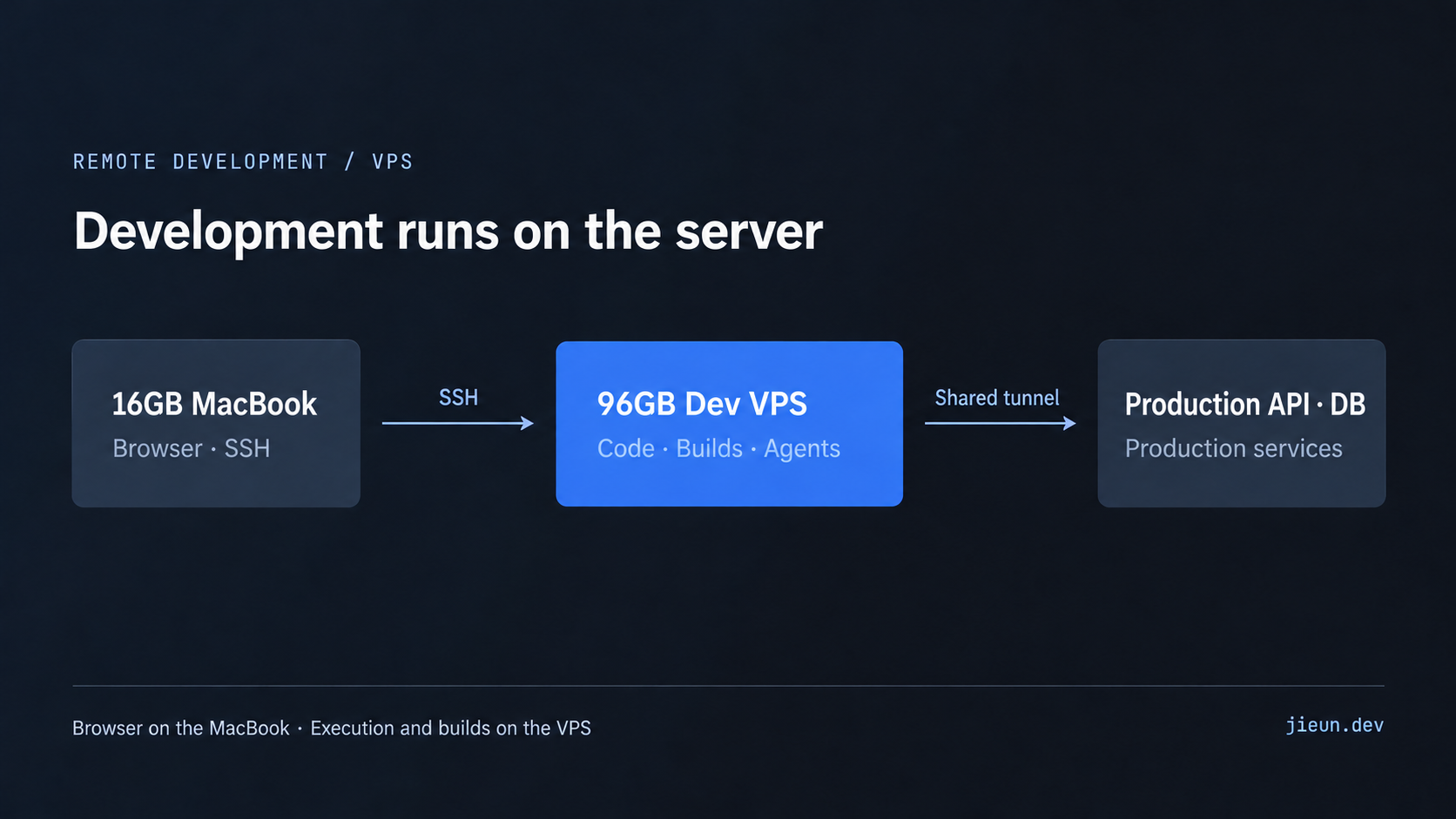
Instead of upgrading each MacBook, we chose a Contabo VPS that cost less at the time.
- 18 CPU cores and 96GB RAM
- Tokyo region
- Code editing, builds, development servers, and coding agents on the VPS
- MacBooks for SSH access and browser checks
Location mattered because we connected from Korea. Browser updates communicate with the development server whenever code changes, so we chose Tokyo to reduce latency.
We ran the development server in the background with nohup so it could survive an SSH disconnection. Coding agents and the development server also used files on the same machine, eliminating the need for a separate file synchronization step.
Sharing the server meant we now had to keep each person’s work separate.
2. Sharing a server while separating workspaces
A shared server did not require everyone to use the same account or permissions.
Developers needed SSH shells and coding agents, while the designer and marketer needed the screens and working environments relevant to their roles.
We gave each person a separate Linux account and home directory. Project files stayed under their own homes, with access to other people’s workspaces and production server credentials blocked.
Accounts alone were not enough.
A port collision could show someone else’s work
When the default port is occupied, Next.js’s next dev can try the next port. A port explicitly specified with -p can instead cause startup to fail on a collision.
For example, if one person’s server already occupied port 3000, another server using the default port could start on 3001. If the second person opened localhost:3000, they would see the first person’s screen instead of their own changes.
We assigned ports by account to prevent this confusion.
| Account | Admin development server |
|---|---|
| A | 3000 |
| B | 3100 |
| C | 3200 |
| Unassigned fallback | 3900 |
The recorded configuration contains three assigned slots and an unassigned fallback. It does not establish a separate assigned port for a fourth person.
A common startup script managed the port numbers. Before starting a server, it checked who owned the listener and stopped if another user’s process occupied the port. Port collisions were checked before startup instead of leaving Next.js to find an available port.
Development servers bound to 127.0.0.1 rather than being exposed directly to the internet. Each person reached their screen through SSH port forwarding.
Google OAuth callbacks were initially registered for a particular port, which limited login on other account ports. Registering the additional ports resolved that limitation.
3. Removing the personal laptop from the API connection
Development servers were separate for each person, but the SSH tunnel to the production API only needed to exist once.
The Next.js admin application acted as a BFF (Backend For Frontend) and needed production API data to render its screens. We had not prepared a separate development API and database, so the development server called the production API.
Initially, one team member opened a reverse SSH tunnel from their MacBook so the shared server could reach that API.
If the laptop shut down or disconnected, other team members lost API access too. Reconnecting the tunnel also depended on that person. A core connection for the shared development environment depended on a personal laptop.
Moving the tunnel into a dedicated service
We moved tunnel management onto the VPS itself. A dedicated Linux account, wdot-tunnel, ran a systemd service responsible for the API connection.
Before:
MacBook → shared VPS → team member’s MacBook SSH tunnel → production API
After:
MacBook → shared VPS tunnel service → production API
The dedicated account had no interactive login shell or sudo privileges.
The production SSH key was restricted using restrict, port-forwarding, and permitopen in authorized_keys. The local forwarding destination was limited to the required API endpoint, while command="/bin/false" blocked shell and command execution. permitopen limits destinations for -L; it does not restrict all reverse forwarding.
Requests to 127.0.0.1:8787 on the shared VPS traveled through the SSH tunnel to 127.0.0.1:8987 on the production server. The production API port also listened only on loopback.
We configured systemd to restart the service after it exited and to start it after a server reboot. Keeping the production connection available no longer required a particular person to keep their laptop on or run SSH manually.
This does not mean every recovery scenario was tested. The records establish the restricted key’s permissions and the service startup and restart configuration.
4. Using Git worktrees to keep tasks separate
Running multiple coding agents and development tasks on one server also required managing file conflicts. Switching branches in the same directory could let one task’s file state affect another.
We used Git worktrees to give each task its own branch and directory under the user’s home.
Finished workspaces were cleaned up automatically, but age alone was not grounds for deletion. Before removing a workspace, we checked for:
- Uncommitted changes or unpushed commits
- An open pull request
- Confirmation that the pull request had been merged
Squash merges can make ordinary branch ancestry checks insufficient for identifying completed work, so cleanup used GitHub’s PR status.
If a workspace had disappeared but its development server was still running, that process was cleaned up too. A server whose workspace still existed was not stopped automatically just because it appeared idle. We did not want to interrupt someone’s work based on an inference.
5. The remaining limitation
The shared VPS eased memory pressure and workspace conflicts, but it did not solve everything.
The main limitation is that development servers still connect to the production API.
This is convenient for checking admin screens against real data without preparing a separate development dataset. However, saving, publishing, or deleting through those screens can change production data.
Withholding direct database credentials does not remove that risk. If the API exposes write operations, its callers can still affect production data.
We therefore decided not to run automated E2E tests in this environment. These tests can repeatedly create or delete data, making a development environment connected to the production API unsafe for them.
When we introduce E2E tests, the plan is to run a separate API, database, and Redis instance on the VPS and prevent the tests from reaching production. This remains planned work, not an implemented result.
Conclusion
The initial change was to move development tools from MacBooks to a server with more memory. Supporting four people required more than adequate hardware.
We separated accounts, workspaces, and ports so people could distinguish their own development servers. A dedicated service replaced the personal laptop’s role in maintaining the production API tunnel.
The setup works for screen development and collaboration, but its dependence on the production API remains a limitation. Automated tests that can modify data will need a separate environment.
More important than sharing one server was deciding which resources to share and which to separate.
Comments