
Part 2 — Four People Sharing One VPS — Role-Based Access, Homes, and Ports
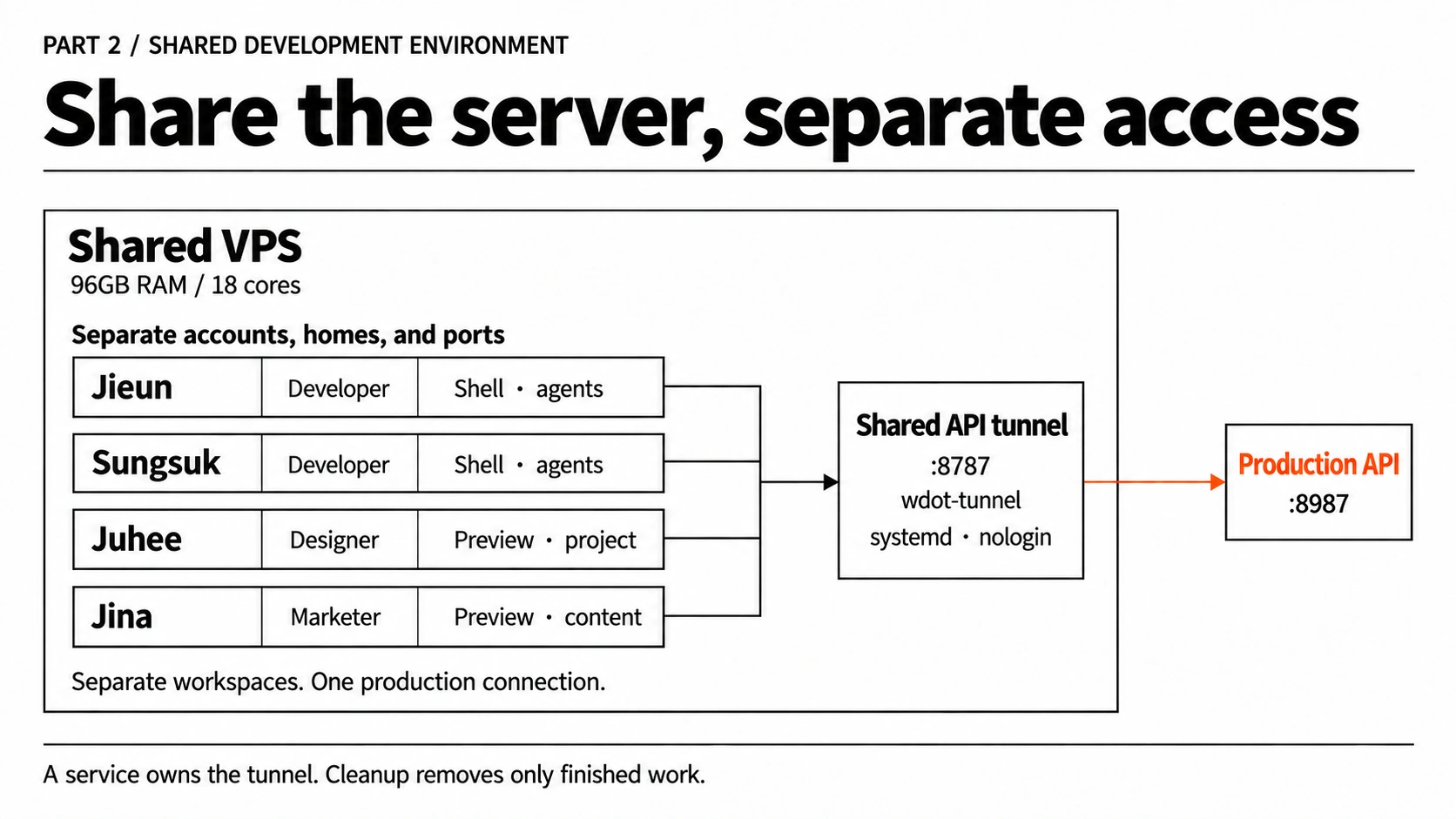
Developers Jieun and Sungsuk, designer Juhee, and marketer Jina started sharing the 96GB, 18-core server we rented after hitting the limits of 16GB MacBooks. We separated permissions, project homes, and ports by role, and isolated production access behind a shared tunnel service.
On this page
- Introduction
- 1 Different roles need different permissions, homes, and ports
- 2 We first decided what needed to be saved
- 3 We separated ports so no one would see someone else’s screen
- 4 We moved production access out of human accounts
- 5 We tied folders to branches so work would not mix
- 6 Deletion depends on work state, not date
- Conclusion
Introduction
In Part 1, I wrote about the three-tier structure split across MacBook, server, and production. This time I am writing about the middle tier: how we divided roles and permissions inside one machine while four people actually shared it.
I am a developer, and Juhee is a designer. Connecting to the same server did not mean we should receive the same permissions or workspace. Developers need a shell and coding agents, but there is no reason to give a designer production-server keys or access to other people’s folders.
The rule was simple. Separate each person’s account, home, and ports, and move shared production resources out of human accounts. Projects live under each person’s home, and dev ports are assigned per account. The production API tunnel that everyone needs is owned only by a restricted service account.
We expected from the beginning that opening multiple sessions could leave dev servers holding memory. So the measurements were not about discovering a problem. They were about confirming the real size and priority. After separating the cost of work folders from the cost of dev servers, we designed the account, home, and port boundaries together with process reclamation.
1. Different roles need different permissions, homes, and ports
Using a shared server does not mean everyone becomes the same person. The resource is shared, but the reason for accessing that resource, and the responsibility attached to it, must stay separate.
| Role | Needs | Not opened | Work location |
|---|---|---|---|
| Developers (Jieun, Sungsuk) | SSH shell, coding agents, dev server, own branch work | Production-server credentials, other people’s homes and processes | Repos and worktrees under each person’s home |
| Designer (Juhee) | Screen preview, scoped development work, own dev port | Production key, direct production DB access, other people’s workspaces | Project under her own home |
| Marketer (Jina) | Required screen preview and content-work scope | Production key, shell and agents, other people’s workspaces | Project under her own home |
| Shared tunnel service | Single forwarding path to the production API | Shell, sudo, agents, arbitrary internal ports | Dedicated wdot-tunnel home |
Instead of opening the whole server to Juhee and Jina, we gave them Tokyo VPS connection instructions and dedicated keys. After the first SSH setup, they connect through fixed aliases. The connection method is simple, but production authority and other people’s workspaces are not opened.
The difference between developer, designer, and marketer is not a question of trust. It is a difference in the surface each role needs. Needing to see a screen does not require logging into the production server, and running an agent does not require keeping production DB credentials in a home directory.
We pushed the production server farther out. Human shells do not hold the production key directly. A systemd service running under a nologin account opens a tunnel only to one allowed destination. People see only 127.0.0.1:8787 on the shared server.
When another person joins, what we add is an account, a home, and a port slot. We do not have to mix another person’s key or production privileges into the setup.
2. We first decided what needed to be saved
The server was not short on resources right now. With 96GB and 18 cores, four people have room, and there is still room for a future e2e environment. But if idle processes keep piling up, every new task begins with the question of what needs to be turned off. So from the beginning, the design included reclaiming idle resources when they become idle.
We checked which resource would limit multiple sessions and a future e2e environment across disk, CPU, and memory, then set the priority for what had to be reclaimed to preserve headroom.
| Item | Value |
|---|---|
| Disk | 7GB used (2%) out of 581GB |
| Memory | 3GB used out of 96GB |
| Load | 0.2 on 18 cores |
The server was nowhere near pressure. The per-unit costs looked like this.
| Item | Size |
|---|---|
| One work folder | 82MB on disk |
.git | 112MB — shared, not copied |
node_modules | Hard-linked from the pnpm global store |
| Coding-agent session | About 350MB of memory |
| One dev server | 1,259MB → 3,759MB over 4 hours, in memory |
Work folders are cheap. .git is shared, and node_modules is hard-linked, so the real increase is mostly the source code. But once e2e test containers and workload grow, today’s headroom can shrink quickly.
The expensive thing is a dev server left on. One dev server is heavier than ten agent sessions, and it grows the longer it stays on.
The rooms were free; the lights were using electricity. The thing to worry about was not the number of folders, but the processes left running.
So the design became: pay more attention to processes than folders, and reclaim idle processes.
3. We separated ports so no one would see someone else’s screen
When several people work on one server, the first thing we had to remove was not a performance problem, but confusion. Thinking you started your own server while actually looking at someone else’s screen is harder to diagnose than a code bug, and it makes the work itself untrustworthy. So we did not stop at warning about port conflicts. We assigned ports ahead of time per account, and if a port belongs to someone else, startup refuses to continue.
next dev does not error when its port is already occupied. It silently moves to the next number.
That creates this situation. You think you started the screen, open localhost:3000, and that is someone else’s screen. The code you just changed is on 3001. You do not know that.
The docs used to say “watch out, it may move to 3001,” but warnings do not prevent incidents.
We assigned numbers by account
| Slot | Account | admin | web | hub |
|---|---|---|---|---|
| 0 | A | 3000 | 4321 | 4331 |
| 1 | B | 3100 | 4421 | 4431 |
| 2 | C | 3200 | 4521 | 4531 |
| Other | (unassigned) | 3900 | 5221 | 5231 |
Only one script knows the ports. We did not write the numbers in docs or other code. If they need to change later, there is one place to change.
Slot 0 being 3000 was not a preference. The Google OAuth callback was registered to that port, so it was the only slot where real login worked. Later, we registered additional ports and loosened that constraint.
Startup goes through one script
scripts/local-up.shIt does these steps in order.
- Check whether my port is already listening. If it is mine, print the address. If it belongs to someone else, stop.
- Check the shared API tunnel.
- Check
.env.localandnode_modules. - Start the server in the background, verify it with
curl, and print the address.
The first step is the core, and the way to decide ownership was interesting. ss -ltnp attaches users:(("next-server",pid=...)) only for my own processes. We use that to distinguish “listening, but not mine.”
listening() { ss -ltn | grep -q "127\.0\.0\.1:$1 "; }mine() { ss -ltnp | grep ":$1 " | grep -q 'users:'; }This folds the older /local procedure into one path. The old habit was to remember the sequence manually: check the tunnel, check the port, start the dev server, then curl the response before reporting a URL. The script makes that order repeatable. Running pnpm dev directly is still possible, but it is easy to misread a down tunnel as a UI bug, or to let Next.js slide to another port and keep looking at the wrong screen.
4. We moved production access out of human accounts
The development server can be shared by four people, but I did not want the path into production to be handed to people in the same way. If the production preview changes depending on who came to work or whose laptop is open, it is not shared infrastructure. It is an outage tied to a person’s daily life. So we changed the production tunnel to be owned by a restricted service instead of a human session.
Ports needed to be separated, but the SSH tunnel to the production API needed to be shared. Since it is loopback on the same machine, one tunnel can serve four people. If each person starts one, the second one dies with ExitOnForwardFailure.
We quickly decided it should be shared. Then we checked who was holding that one shared tunnel.
$ ss -ltnp | grep :8787127.0.0.1:8787 users:(("sshd",pid=78803)) ← not an ssh clientsshd was holding it. The server had not connected outward. Someone had connected inward and pushed the port in. One person’s MacBook was running reverse forwarding with ssh -R.
One of the earlier criteria was “my laptop should not be involved.” In reality, that criterion was not being met.
It was a workaround, not a mistake
The production key was not on the shared machine. Only one person had the key, so that person pushed a reverse tunnel from their laptop and let four people use it. It was a reasonable workaround: four people could share access without copying the key around.
But it creates this shape.
| Risk | What happens |
|---|---|
| Laptop as single point of failure | If that person sleeps or leaves the office, all four people are down |
| No reconnection | If it drops, that person must restart it manually |
| No reboot recovery | After a machine reboot, no one can use it |
| Instructions hit a dead end | The script says “start it with this key,” but the key is not on the machine |
The last one was the worst. When the tunnel died, the instruction printed by the script ended with no such identity. At the most urgent moment, the instructions were impossible to execute.
(The old tunnel installation script was also macOS-only through launchd. It was meant for a designer’s MacBook, so it could not run on Linux in the first place, but the documentation told people to run it there. No one had actually run it, so no one noticed.)
We changed only one place
Across the whole path, we changed one thing: who owns 8787.
[Before]  4 machinesmy MacBook        shared server           A's MacBook      production server──────────        ─────────────           ───────────      ─────────────────browser    ──▶    next dev                    │ API_BASE=127.0.0.1:8787                    ▼                 :8787  ◀── sshd ──  ssh -R 8787  ──▶  :8987
[After]  3 machinesmy MacBook        shared server                            production server──────────        ─────────────                            ─────────────────browser    ──▶    next dev                    │ API_BASE=127.0.0.1:8787                    ▼                 :8787  ── wdot-api-tunnel (systemd) ──▶  :8987
The middle laptop disappeared.
We created a new account
wdot-tunnel uid 999 · nologin · no sudo · no wheelI first considered putting this under the existing admin account, but stopped. That account had uid 1000, both sudo and wheel, and a person actually used it. Putting the production key there would go against the goal. A new account that cannot log in was the right boundary.
[Service]User=wdot-tunnelExecStart=/usr/bin/ssh -N -o ExitOnForwardFailure=yes \  -o ServerAliveInterval=30 -o ServerAliveCountMax=3 \  -o StrictHostKeyChecking=yes \  -o UserKnownHostsFile=/home/wdot-tunnel/.ssh/known_hosts \  -i /home/wdot-tunnel/.ssh/<key> \  -L 8787:127.0.0.1:8987 ubuntu@<production-server>Restart=alwaysRestartSec=5
[Install]WantedBy=multi-user.target
The local wdot-tunnel account owns the process on the VPS. Separately, the key options in the production server’s authorized_keys restrict what that SSH key can do after authentication. These are two different account boundaries.
The older designer key showed the boundary we needed
In August, before the shared VPS version, Juhee was developing on her own MacBook. That required a different shape: her laptop needed the UI server locally, but the API still lived behind the production server. The useful part of that setup was not the laptop-specific workflow. It was the SSH boundary: authenticate the person, then authorize only the one tunnel the screen needs.
Those are separate layers.
someone knocks on port 22 │ ├─ no registered private key → Permission denied (publickey) │ └─ has the allowed key → authenticated └─ key options apply → one tunnel, no shellThe restriction is not what keeps strangers out. Public-key authentication does that first. The restriction narrows what an authenticated key can do after it is accepted.
The reason this works is that a single SSH connection can carry different channel types.
one SSH connection├── session channel → shell or command execution└── direct-tcpip channel → local port forwarding with -LSo the shell can be blocked while local port forwarding still works. The older key was written as a per-key rule in authorized_keys.
restrict,port-forwarding,permitopen="127.0.0.1:8987",command="/bin/false" ssh-ed25519 AAAA... designerEach option had a specific job.
| Option | Role |
|---|---|
restrict | Turns off optional SSH features by default, including pty, X11, agent forwarding, user rc, and forwarding |
port-forwarding | Turns forwarding back on for this key |
permitopen="127.0.0.1:8987" | Limits -L forwarding destinations to this host-side API address |
command="/bin/false" | Prevents a useful shell or command path if a session channel is requested |
That example is about local forwarding with -L. It should not be overread as proof that every possible reverse-forwarding shape is blocked by permitopen alone; OpenSSH documents the separate permitlisten option for reverse-forward listeners. The actual point was narrower and more useful. For a designer preview, the key could create one client-local tunnel to the API endpoint, and could not be used as a normal shell key.
The recorded verification was also narrow. Shell login and command execution were checked and blocked for that key. The one-destination tunnel, revocation path, and service-owned shared tunnel are configuration boundaries described by the key options and systemd unit, not a claim that every route was freshly tested in production.
The fixed 127.0.0.1:8987 endpoint mattered. The API container itself had an address that could move after deploys, so the first version tried to discover the container IP before starting the tunnel. That made the restriction hard to express. Publishing the API only on the production host’s loopback solved that part.
ports: ["127.0.0.1:8987:8787"]The internet still could not reach it, because the port bound only to loopback. But SSH could now pin the destination to a stable host address. In ssh -L 8787:127.0.0.1:8987 server, that destination is resolved on the server side, not on the laptop.
Revocation was also deliberately small. Removing that one authorized_keys line prevents new authentications with the key. An established SSH connection still needs to be terminated separately; removing the key does not close its existing channels or prevent it from requesting another channel.
The September shared-VPS design kept the same principle and changed the owner. Instead of a designer’s personal key opening a tunnel from a MacBook, a nologin service account now owns the shared :8787 tunnel from the VPS. Human accounts use the API through the shared loopback port, while the production key lives with the service boundary.
A separate preview environment was another option. It would have removed this production dependency, but reproducing the data needed by the screens required additional setup. The restricted tunnel was the compromise for the current workflow, not a replacement for a separate test environment.
This does not replace application authorization. If the API route itself allows saving, publishing, or deleting, the route still needs its own auth and write-permission checks. SSH isolation only controls the pipe to the API, not what the API allows after a request arrives.
5. We tied folders to branches so work would not mix
Separating folders by person is not only about keeping things tidy. If several sessions switch branches inside one folder, one session’s state contaminates another session. So we tied one task to one branch and one folder, and kept that state inside each person’s home.
Opening several sessions and working at the same time breaks branch switching. With git worktree, we made it one task = one branch = one folder.
scripts/wt.sh feat/feature-name# → .worktrees/YYYY-MM-DD/feat-feature-name/There is only one rule: date and branch name. The date groups work for two reasons: finding it later (“what was I doing yesterday?”) and throwing it away later, because old folders stand out.
The location is .worktrees/ inside the repo. That slot was already registered in .gitignore as a local isolated workspace, so we used it as-is.
Even if the script runs inside a work folder, all work folders still need to gather in one place. So the script asks git for the main repository instead of trusting the current directory.
REPO="$(dirname "$(git rev-parse --path-format=absolute --git-common-dir)")"--git-common-dir points to the main .git directory even when the command runs inside a worktree.
6. Deletion depends on work state, not date
The most important decision in automatic cleanup was not “how old is this?” but “is this work really finished?” Deleting old folders is easy, but an old folder can still hold needed work, and a folder created today may already be done. So the date is only a grouping key for finding things. Deletion depends on the save, push, and PR state of the work.
scripts/wt-gc.sh # preview — deletes nothingscripts/wt-gc.sh --apply # actual cleanupPreview is the default. It should feel safe to look at the list, or people will not run it.
The script checks four things in order. If any one of them applies, it does not touch the worktree.
① Any unsaved changes? → keep② Any unpushed commits? → keep③ Is the PR still open? → keep④ Was the PR closed without merge? → keep + mark "check"──────────────────────────────────────────────── None of the above, and PR is merged → deleteDate is not the criterion. If a folder is three months old but its PR is still open, it stays forever. If a folder was created today and its PR is merged, it can be deleted within an hour. We delete finished work, not old work.
The first check also catches new files that were never added. If a folder survives because of one memo file, that is the right outcome.
The order matters too. Checks ① and ② only need local state, so they are fast. Checks ③ and ④ need GitHub, so they are slower. The order also matches the size of the loss. If ① catches something, that work is not even committed, so there is no recovery path.
Why PR state is authoritative
When a PR is squash-merged, the branch’s commits are combined into one commit on main. The original commits do not exist anywhere on main. So if we ask git, “was this branch merged?”, git says no, even though the work was merged.
If we trusted only git, we would not delete any merged folders. So the script asks GitHub for the PR state directly.
For the same reason, branch deletion needs git branch -D instead of git branch -d. Lowercase -d always refuses because it thinks the branch is unmerged. We did not turn off safety; we replaced it with the more accurate safety check. Step ③ already confirmed the PR was merged.
Dev servers are split conservatively
| Situation | Automatic (--apply) | Manual (--reap) |
|---|---|---|
| Orphaned, because the work folder is already gone | Stop it | Stop it |
| Folder still exists and has been quiet for a long time | Do not touch, only report | Stop it |
| Currently active | Do not touch | Do not touch |
The reason orphaned servers are automatic matters. When the cleanup tool deletes a folder, the server that was running inside it immediately becomes an orphan. If we do not clean that up too, we save 82MB of disk while leaving 3.7GB of memory behind. The real leak remains.
By contrast, “the folder exists, but the server has been quiet” is an inference. It is guessed from log and .next modification times, so it stays out of automatic cleanup. Still, the loss is low. A dev server is not data. It can be started again.
What cron actually does
Cron is not a vague job that deletes old folders. Under each account’s own permissions, it runs scripts/wt-gc.sh --apply every hour and inspects only .worktrees/YYYY-MM-DD/ under that account’s project home. It does not touch the production server or anyone else’s home.
The order is:
- Find the main repository that contains the script. Cron’s current directory may be the home directory, so the repo is calculated from the script location.
- Walk the dated worktrees.
- Keep worktrees with unsaved changes, unpushed commits, or an open PR.
- If a PR was closed without merging, do not delete it; mark it as
needs check. - If none of those conditions apply and the PR was merged, delete the worktree together with its branch. The default command is preview-only; only cron uses
--apply. - If an orphaned dev server remains after its worktree is already gone, stop that process too. If a worktree still exists and its dev server has merely been quiet for a long time, do not stop it based on that guess.
So cron’s job is to clean finished workspaces every hour and reclaim dev processes left behind without a workspace. It does not restart the production API tunnel, stop a server someone is using, or judge a person’s work from idle time alone.
Conclusion
| Criterion | Result |
|---|---|
| No one should see someone else’s screen | ✅ port assignment + startup refusal when the port belongs to someone else |
| Shared resources should not depend on a person | ✅ the tunnel runs as a nologin account’s systemd service |
| Finished work should clean itself up | ✅ only merged PR worktrees, every hour |
| There should be no path for work to disappear | ✅ if any one of the four checks catches something, cleanup does not touch it |
| Cleanup should not depend on human memory | ⚠️ cron is installed, but idle dev servers still need manual cleanup |
The last line is intentional. Idle time alone is too weak a reason to stop a dev server. If abandoned servers keep becoming a problem, we can build a more precise activity signal, but right now only 3GB of 96GB is used, so it is not the highest priority.
The biggest gain from this design was setting boundaries before the problem got bigger. We measured resources and confirmed that memory needed attention before disk. Then we designed process reclamation and role-based permissions together. After applying cron and logs, we could distinguish finished work from still-live work. Because we made the assumptions early and verified them on a small surface, the automation did not have to depend only on people’s memory or attention.
Comments